

YouTube Comment Translate (Toggle ON/OFF) — это пользовательский скрипт, предназначенный для автоматического добавления кнопки перевода к комментариям на YouTube.
Он предоставляет удобный способ мгновенного перевода текста комментариев на русский язык с возможностью обратного переключения к оригиналу. Скрипт работает в реальном времени, отслеживая изменения на странице и автоматически добавляя функциональность перевода к новым комментариям, которые загружаются динамически.
Основные функции:
Добавление кнопки «Перевести» рядом с каждым комментарием.
Автоматическое определение языка комментария.
Перевод на русский язык через неофициальный Google Translate API.
Двусторонний переключатель — повторное нажатие возвращает оригинальный текст.
Поддержка динамически загружаемых комментариев, благодаря использованию
MutationObserver.
Как это работает на практике:
Пользователь открывает видео на YouTube.
Скрипт добавляет к каждому комментарию кнопку «Перевести».
При нажатии комментарий переводится на русский, а кнопка меняется на «Оригинал».
При повторном нажатии отображается исходный текст.
Технические детали:
Скрипт работает в рамках YouTube через
@match https://www.youtube.com/*.Не требует доступа к сторонним API-ключам или авторизации.
Перевод происходит с помощью URL-запроса к: https://translate.googleapis.com/translate_a/single
- Текст переводится «на лету», без перезагрузки страницы.
Возможные ограничения:
Используемый API может иметь ограничения по объёму или скорости запросов.
Перевод может быть не всегда точным, как и у любого машинного перевода.
Функциональность может перестать работать, если YouTube изменит структуру DOM или если Google ограничит доступ к API.
Пример работы скрипта:
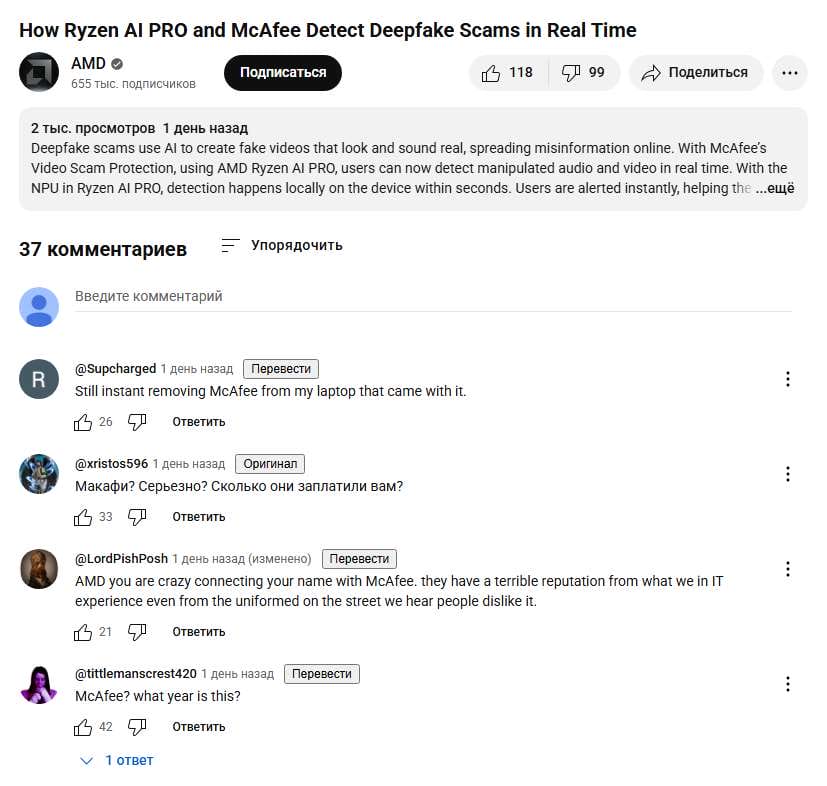
Скрипт YouTube Comment Translate (Toggle ON/OFF):
// ==UserScript==
// @name         YouTube Comment Translate (Toggle ON/OFF)
// @namespace    https://chat.openai.com/
// @version      2.1
// @description  Translate YouTube comments and toggle original back
// @author       OpenAI
// @match        https://www.youtube.com/*
// @grant        none
// ==/UserScript==

(function () {
  'use strict';

  const TARGET_LANG = 'ru';

  async function translate(text) {
    const url = `https://translate.googleapis.com/translate_a/single?client=gtx&sl=auto&tl=${TARGET_LANG}&dt=t&q=${encodeURIComponent(text)}`;
    try {
      const res = await fetch(url);
      const data = await res.json();
      return data[0].map(d => d[0]).join('');
    } catch (err) {
      return '[Ошибка перевода]';
    }
  }

  function addButtonToComment(commentNode) {
    if (commentNode.querySelector('.yt-translate-btn')) return;

    const contentText = commentNode.querySelector('#content-text');
    if (!contentText) return;

    const originalText = contentText.innerText;

    const btn = document.createElement('button');
    btn.textContent = 'Перевести';
    btn.className = 'yt-translate-btn';
    btn.style.marginLeft = '10px';
    btn.style.fontSize = '12px';
    btn.style.cursor = 'pointer';

    let isTranslated = false;
    let translatedText = '';

    btn.onclick = async () => {
      if (!isTranslated) {
        btn.textContent = 'Перевожу...';
        translatedText = await translate(originalText);
        contentText.innerText = translatedText;
        btn.textContent = 'Оригинал';
        isTranslated = true;
      } else {
        contentText.innerText = originalText;
        btn.textContent = 'Перевести';
        isTranslated = false;
      }
    };

    const targetContainer = commentNode.querySelector('#header-author');
    if (targetContainer) targetContainer.appendChild(btn);
  }

  const observer = new MutationObserver(() => {
    document.querySelectorAll('ytd-comment-thread-renderer').forEach(addButtonToComment);
  });

  observer.observe(document.body, { childList: true, subtree: true });
})();
Примечание
- Скрипт создан с помощью ChatGPT
Как использовать скрипт с расширением Violentmonkey я рассказал в статье:
Как убрать баннер «Прежде чем перейти к Google»
На момент публикации статьи скрипт работал должным образом.
Работоспособность скрипта проверялась с расширением Violentmonkey в следующих браузерах:
- Brave Browser
- Google Chrome
- Microsoft Edge
Дополнение
YouTube Inline Translate – улучшенная версия скрипта с возможностью перевода дочерних комментариев.
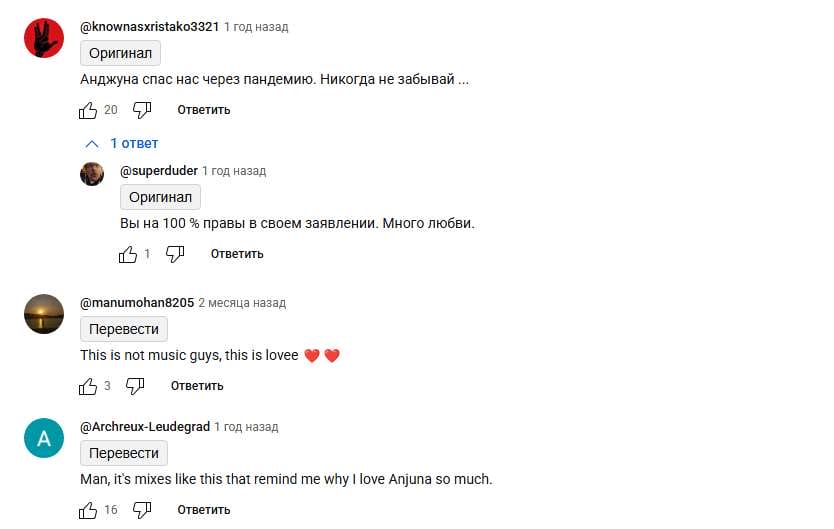
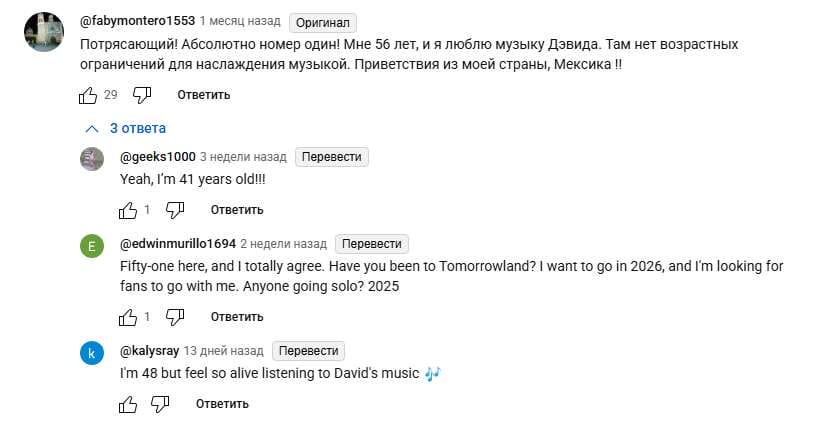
Скрипт добавляет кнопки перевода над всеми комментариями YouTube, включая дочерние (ответы), с сохранением оригинального текста и визуальной идентичностью YouTube UI.
1.Расположение кнопки над комментарием
// ==UserScript==
// @name         YouTube Inline Translate Replace Text [Gray Button Above]
// @namespace    Violentmonkey Scripts
// @version      1.5
// @description  Adds gray translate/original buttons above YouTube comments
// @match        https://www.youtube.com/*
// @grant        none
// ==/UserScript==

(function() {
    'use strict';

    const targetLang = 'ru';

    function styleButton(btn) {
        btn.style.backgroundColor = '#f2f2f2';
        btn.style.color = '#030303';
        btn.style.border = '1px solid #d3d3d3';
        btn.style.borderRadius = '4px';
        btn.style.fontWeight = '500';
        btn.style.fontSize = '14px';
        btn.style.cursor = 'pointer';
        btn.style.marginRight = '8px';
        btn.style.padding = '4px 8px';
        btn.style.transition = 'background 0.2s ease';
        btn.onmouseover = () => btn.style.backgroundColor = '#e5e5e5';
        btn.onmouseout = () => btn.style.backgroundColor = '#f2f2f2';
    }

    const observer = new MutationObserver(() => {
        document.querySelectorAll('#content-text:not([data-translated])').forEach(comment => {
            comment.setAttribute('data-translated', 'true');

            const originalText = comment.textContent.trim();

            const container = document.createElement('div');
            container.style.marginBottom = '4px';

            const translateButton = document.createElement('button');
            translateButton.textContent = 'Перевести';
            styleButton(translateButton);

            const originalButton = document.createElement('button');
            originalButton.textContent = 'Оригинал';
            styleButton(originalButton);
            originalButton.style.display = 'none';

            translateButton.onclick = () => {
                translateButton.disabled = true;
                translateButton.textContent = 'Перевожу...';

                fetch(`https://translate.googleapis.com/translate_a/single?client=gtx&sl=auto&tl=${targetLang}&dt=t&q=${encodeURIComponent(originalText)}`)
                .then(res => res.json())
                .then(data => {
                    const translated = data[0].map(x => x[0]).join('');
                    comment.textContent = translated;
                    translateButton.style.display = 'none';
                    originalButton.style.display = 'inline';
                })
                .catch(err => {
                    console.error(err);
                    translateButton.textContent = 'Ошибка';
                });
            };

            originalButton.onclick = () => {
                comment.textContent = originalText;
                translateButton.style.display = 'inline';
                translateButton.disabled = false;
                translateButton.textContent = 'Перевести';
                originalButton.style.display = 'none';
            };

            container.appendChild(translateButton);
            container.appendChild(originalButton);

            comment.parentNode.insertBefore(container, comment);
        });
    });

    observer.observe(document.body, {childList: true, subtree: true});
})();
2.Расположение кнопки справа от имени пользователя
// ==UserScript==
// @name         YouTube Inline Translate Next to Author [Gray Button Near Name]
// @namespace    Violentmonkey Scripts
// @version      2.0
// @description  Adds translate/original buttons next to YouTube comment authors (supports replies)
// @match        https://www.youtube.com/*
// @grant        none
// ==/UserScript==

(function () {
    'use strict';

    const targetLang = 'ru';

    function styleButton(btn) {
        btn.style.backgroundColor = '#f2f2f2';
        btn.style.color = '#030303';
        btn.style.border = '1px solid #d3d3d3';
        btn.style.borderRadius = '4px';
        btn.style.fontWeight = '500';
        btn.style.fontSize = '12px';
        btn.style.cursor = 'pointer';
        btn.style.marginLeft = '8px';
        btn.style.padding = '2px 6px';
        btn.style.transition = 'background 0.2s ease';
        btn.style.verticalAlign = 'middle';
        btn.onmouseover = () => btn.style.backgroundColor = '#e5e5e5';
        btn.onmouseout = () => btn.style.backgroundColor = '#f2f2f2';
    }

    const observer = new MutationObserver(() => {
        document.querySelectorAll('#content-text:not([data-translated])').forEach(comment => {
            comment.setAttribute('data-translated', 'true');

            const originalText = comment.textContent.trim();
            const container = document.createElement('span');

            const translateButton = document.createElement('button');
            translateButton.textContent = 'Перевести';
            styleButton(translateButton);

            const originalButton = document.createElement('button');
            originalButton.textContent = 'Оригинал';
            styleButton(originalButton);
            originalButton.style.display = 'none';

            translateButton.onclick = () => {
                translateButton.disabled = true;
                translateButton.textContent = 'Перевожу...';

                fetch(`https://translate.googleapis.com/translate_a/single?client=gtx&sl=auto&tl=${targetLang}&dt=t&q=${encodeURIComponent(originalText)}`)
                    .then(res => res.json())
                    .then(data => {
                        const translated = data[0].map(x => x[0]).join('');
                        comment.textContent = translated;
                        translateButton.style.display = 'none';
                        originalButton.style.display = 'inline';
                    })
                    .catch(err => {
                        console.error(err);
                        translateButton.textContent = 'Ошибка';
                    });
            };

            originalButton.onclick = () => {
                comment.textContent = originalText;
                translateButton.style.display = 'inline';
                translateButton.disabled = false;
                translateButton.textContent = 'Перевести';
                originalButton.style.display = 'none';
            };

            container.appendChild(translateButton);
            container.appendChild(originalButton);

            const header = comment.closest('#body')?.querySelector('#header-author');
            if (header) {
                header.appendChild(container);
            } else {
                // fallback if header not found
                comment.parentNode.insertBefore(container, comment);
            }
        });
    });

    observer.observe(document.body, { childList: true, subtree: true });
})();
По состоянию на 16.07.2025 скрипты работали должным образом.
Работоспособность скриптов проверялась с расширением Violentmonkey в следующих браузерах:
- Brave Browser
- Google Chrome
- Microsoft Edge